


The lunar cycle is a game feature introduced in The Sims 3: Supernatural and The Sims 4. It adds dynamic moon phases to the game. The cycle may cause some bizarre events to occur in a world, affecting occult Sims in particular.
The Sims 3: Supernatural[]
The feature is supported in every world, including those from the Store and custom worlds. It can neither be turned off nor removed from the game.
Players can check which lunar phase it is in the current world by looking at the moon icon in front of a Sim's portrait at the bottom-middle of the game UI. They can also check how many days it is until the full moon by hovering the mouse cursor over the moon icon. Sims can also check the lunar phase by viewing a lunar dial in community lots or purchased for their home.
Moon phases[]
There are eight moon phases in the Lunar Cycle. When starting a new save game, the first moon phase may be the First Quarter, unless the player "Set to Single Lunar Phase" in the options.
|
|


Options[]
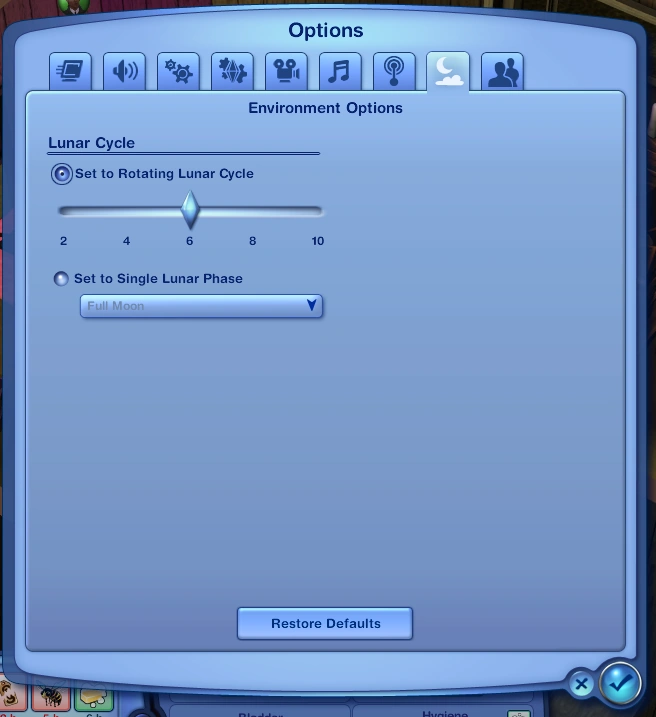

Options
At the game options, there is an "Environment Options" tab which changes the options of the Lunar Cycle. There are two options which are "Set to Rotating Lunar Cycle" and "Set to Single Lunar Phase", obviously the player must choose one. These options are applied universally and not per saved game.
- Set to Rotating Lunar Cycle
The player can set the duration of each lunar cycle from 2 to 10 days, by the multiple of 2. This can affect the moon phases. The default game setting is 6 days.
- Set to Single Lunar Phase
The player can set the lunar phase which will be carried out throughout the whole game.
Effects on Sims' behavior[]
Nothing bizarre will happen on most moon phases. On the full moon however, some bizarre events will happen around the neighborhood.
- Sims who possess werewolf powers automatically transform and cannot become human until the next morning
- Witches spend 50% less magic power and gains 25% more successful spell rate.
- Some Sims turn into zombies
- Significantly more ghosts
- Sims will sometimes wake up during their sleep to "Freak Out".
- Regular Sims are capable of using the "Lunatic Embrace" and "Lunatic Slap" interactions, found under romantic and mean respectively. Bystanders and even Sims that have good terms with another will lunatic slap them autonomously.
- Pets[TS3:P] will become skittish until morning
Fairies are affected by the lunar cycle as well. They gain the "Energized by Moonlight" moodlet, which changes in value over the cycle, being at its most powerful during the full moon. During the new moon, however, they gain the "Starving for Moonlight" moodlet, which decreases their mood by 5 mood points. Fairies can "Lament The Moonless Night" to another Sim when they have this moodlet.
During full moon, fairies will also Freak Out (even if they aren't sleeping) and get the Soulpeace moodlet as well (resulting in them choosing random outfits when swimming or going to sleep).
According to game tips, potions when consigned at the elixir consignment register during the full moon, the seller may profit from them better.
The Sims 4[]
The lunar cycle returned in The Sims 4 in patch 131 before the release of The Sims 4: Werewolves. Moon phases are available in almost every world, and cannot be turned off or removed. However, a few worlds (such as the The Magic Realm, Batuu and Sixam) do not have a lunar cycle due to their unique locations.
Players can always check what the lunar phase is by looking at the UI to the left of the time of day, under the time speed controls. They can also check when the next phase is by checking the calendar. In the Werewolves world, Moonwood Mill, there is a lunar dial in the open areas that Sims can use to see what the current lunar phase is.
Moon phases[]
There are eight moon phases in the lunar cycle. Each phase of the moon changes the lighting of each night, ranging from new moons producing the darkest nights, to full moons being the brightest nights. The first phase may be the New Moon, unless the player "Set Permanent Phase" in the options.
Options[]
In the game options, there is an "Environment" tab which changes the options of the lunar cycle. There are three options: "Lunar Cycle Length", "Set Permanent Phase", and "Disable Lunar Effects". Players can only choose a set moon phase or the length of the cycle, but disabling lunar effects is optional.
Lunar cycle length[]
The player can set the duration of each lunar cycle to two, four, eight, sixteen, or twenty four days. The default setting is eight days.
Set permanent phase[]
The player can set a permanent moon phase that will never change.
Effects on Sims and objects[]
The lunar cycle has different effects on Sims and objects, with occult Sims being affected the most. These effects can be disabled in the options.
- Sims can moonbathe.
- Additionally, moonbathing a Child Sim also builds Creativity skill.
- Toddlers can ask about the moon phases and have special moon dreams depending on the phase.
- Aliens receive an "Extraterrestrial Nostalgia" moodlet when moonbathing.[TS4:GTW]
- Vampires gain vampire energy regeneration on nights with a new moon.[TS4:V]
- Mermaids have a lowered hydration loss on full moons.[TS4:IL]
- Spellcasters have increased spellcasting success on full moons.[TS4:ROM]
- Jewelry and gemstone cuts made with the gemology skill can be placed on a crystal charging grid under moonlight to bestow magical effects. How long it takes to fully charge is determined by the phase of the moon.[TS4:CCS]
Werewolves[]
Werewolves are affected by each moon phase more specifically, with the full moon being the strongest. Werewolves receive the bonuses past 9 PM (21:00) up to 6 AM.
- On a New Moon, Werewolves receive a nighttime sleep mood benefit, when they sleep during a new moon they receive a strong moodlet when they wake up.
- On a Waxing Crescent Moon, Werewolves receive a skill gain to fitness activities.
- On a First Quarter Moon and a Third Quarter Moon, Werewolves have increased relationship gain and loss.
- On a Waxing Gibbous Moon, Werewolves receive a heightened fighting prowess allowing more successful fights.
- On a Full Moon, Werewolves receive a "Call of the Beast" +3 angry moodlet which generates a lot of fury on all Werewolves, momentarily causing them to rampage and only stopping once the full moon is over, or however, a werewolf successfully resists control.
- On a Waning Gibbous Moon, Werewolves receive a skill gain to the handiness skill.
- On a Waning Crescent Moon, Werewolves receive a skill gain to logic and reading activities.